# Visual Desktop .net 2025.01

**<span style="font-size: 12.0pt; font-family: 'system-ui',serif; mso-fareast-font-family: 'system-ui'; mso-bidi-font-family: system-ui; mso-bidi-theme-font: minor-latin; mso-font-kerning: 0pt; mso-ligatures: none; mso-fareast-language: DE-AT;">Release: 2025.01</span>**

**<span style="font-size: 12.0pt; font-family: 'system-ui',serif; mso-fareast-font-family: 'system-ui'; mso-bidi-font-family: system-ui; mso-bidi-theme-font: minor-latin; mso-font-kerning: 0pt; mso-ligatures: none; mso-fareast-language: DE-AT;">TEACHERS.*direct* Anträge:</span>**

- <span style="font-size: 12.0pt; font-family: 'system-ui',serif; mso-fareast-font-family: 'system-ui'; mso-bidi-font-family: system-ui; mso-bidi-theme-font: minor-latin; mso-font-kerning: 0pt; mso-ligatures: none; mso-fareast-language: DE-AT;">Aktuell können über TEACHERS.direct folgende Anträge eingebracht werden:</span>
    - <span style="font-size: 12.0pt; font-family: 'system-ui',serif; mso-fareast-font-family: 'system-ui'; mso-bidi-font-family: system-ui; mso-bidi-theme-font: minor-latin; mso-font-kerning: 0pt; mso-ligatures: none; mso-fareast-language: DE-AT;">Ansuchen um Weiterverwendung</span>
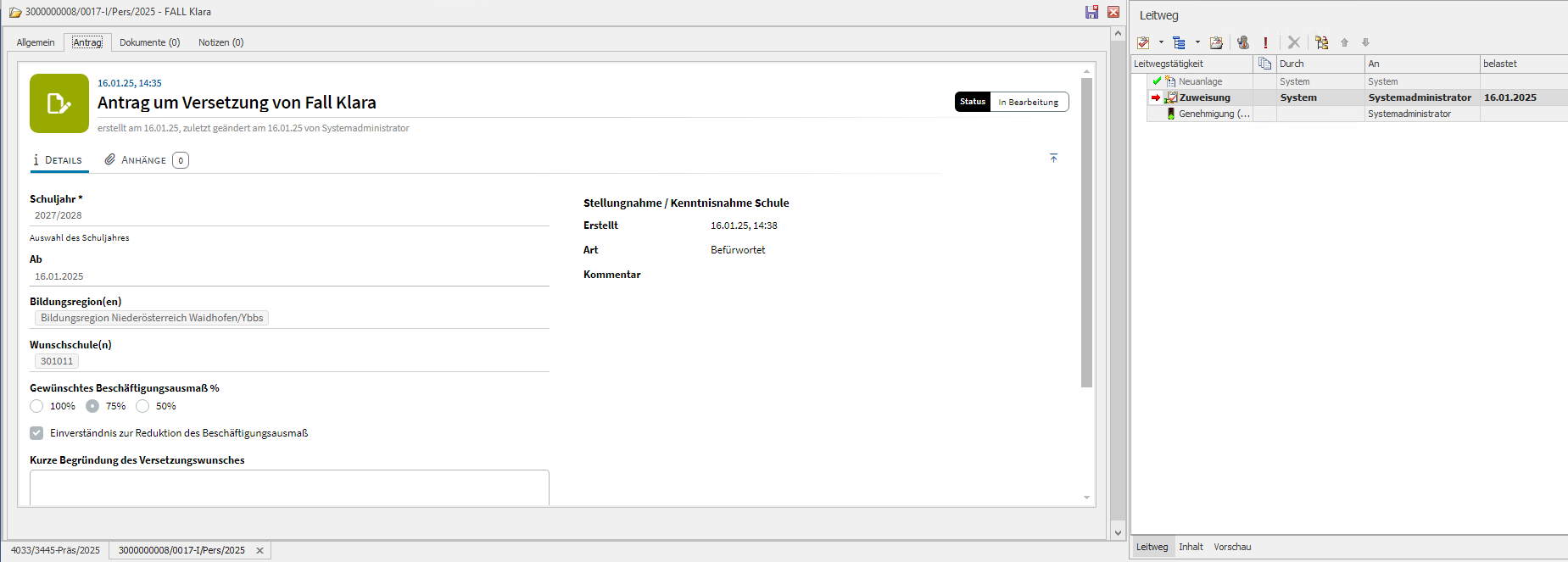
    - <span style="font-size: 12.0pt; font-family: 'system-ui',serif; mso-fareast-font-family: 'system-ui'; mso-bidi-font-family: system-ui; mso-bidi-theme-font: minor-latin; mso-font-kerning: 0pt; mso-ligatures: none; mso-fareast-language: DE-AT;">Antrag um Versetzung</span>
    - <span style="font-size: 12.0pt; font-family: 'system-ui',serif; mso-fareast-font-family: 'system-ui'; mso-bidi-font-family: system-ui; mso-bidi-theme-font: minor-latin; mso-font-kerning: 0pt; mso-ligatures: none; mso-fareast-language: DE-AT;">Antrag zur Kontoerklärung</span>

<span style="font-size: 12.0pt; font-family: 'system-ui',serif; mso-fareast-font-family: 'system-ui'; mso-bidi-font-family: system-ui; mso-bidi-theme-font: minor-latin; mso-font-kerning: 0pt; mso-ligatures: none; mso-fareast-language: DE-AT;">Diese werden, nach erfolgter Befürwortung der Schule, im Arbeitskorb des jeweiligen Sachbearbeiters angezeigt.</span>

<span style="font-size: 12.0pt; font-family: 'system-ui',serif; mso-fareast-font-family: 'system-ui'; mso-bidi-font-family: system-ui; mso-bidi-theme-font: minor-latin; mso-font-kerning: 0pt; mso-ligatures: none; mso-fareast-language: DE-AT;">Ist keine Befürwortung notwendig, so werden diese direkt im Arbeitskorb des Sachbearbeiter angezeigt. (z.B. bei Kontoerklärungen)</span>

[![image.png](https://help.intercom.at/uploads/images/gallery/2025-01/scaled-1680-/r7eimage.png)](https://help.intercom.at/uploads/images/gallery/2025-01/r7eimage.png)

Ein Antrag kann entweder ***Genehmigt*** oder ***Abgelehnt*** werden.

Dafür wurde eine neue Leitwegstätigkeit "Genehmigung (Anträge)" erstellt, welche automatisch bei jedem Leitweg eines Antrages hinterlegt ist.

Die jeweilige Aktion wird mit der Schule und dem Antragssteller geteilt.


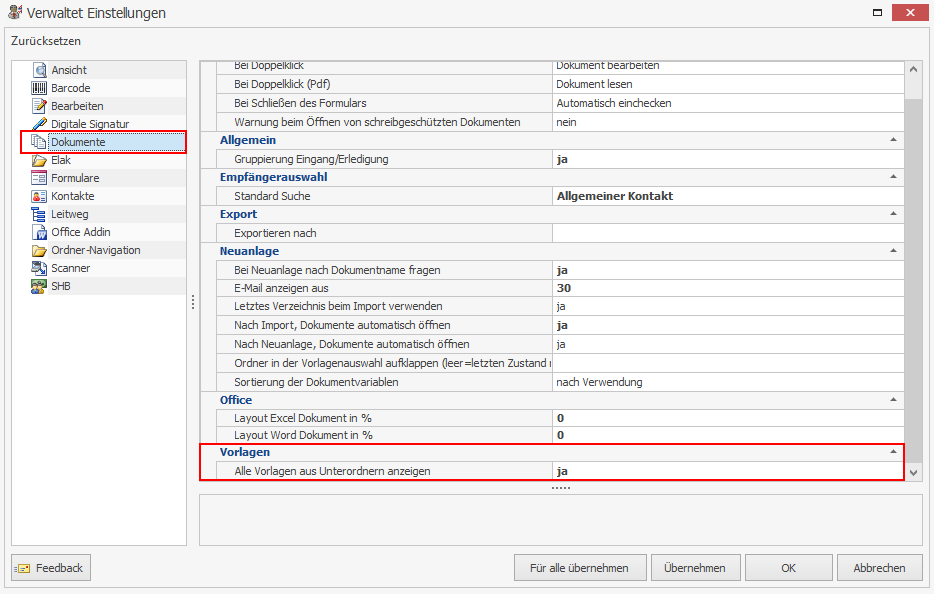
**Untergeordnete Dokumentvorlagen anzeigen lassen:**

Möchte man sich auf jeder Ebene in der Dokumentvorlagen-Verwaltung die untergeordneten Dokumente anzeigen lassen, dann kann man diese Funktion nun in den Optionen aktivieren/deaktivieren.

[![image.png](https://help.intercom.at/uploads/images/gallery/2025-01/scaled-1680-/t7yimage.png)](https://help.intercom.at/uploads/images/gallery/2025-01/t7yimage.png)